


Main Improvements in in4mo Release 17.4
The in4mo 17.4 release includes feature improvements and bug fixes, as well as security, stability, and performance improvements. Here you will find a summary of the changes. Depending on country, region, and feature activation, the availability and presentation might differ from the descriptions.
New Role Permission to See Task Totals
In in4mo’s cost calculation it depends on settings and user rights what costs are visible to whom. In response to customer feedback, we are now adding a new setting with which different roles can be given the right to see task totals for all tasks in a case, including the task totals of other partners. Single work item costs of other partners will not be visible.
If a role, for example the project manager role, has been given the permission to see task totals with this new setting, then all project managers working in that portal will see all task totals in the cost control table, but will not see single work items costs. If project managers have been given the right to see single work item costs because of some other role permission, that right will not be removed with this setting.
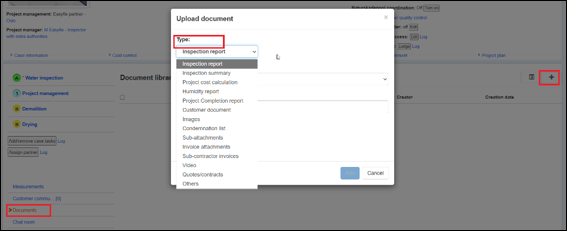
Additional Document Categories
In in4mo all documents that are either created via the application or uploaded by customers are assigned a category, such as ‘Inspection report’, ‘Customer Document’, or ‘Other’. With the introduction of in4mo’s document integration, the need for more document types has grown, and in this release we are adding more document categories.
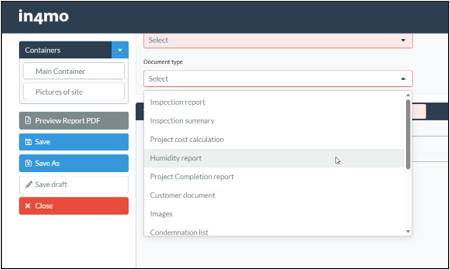
The document categories that will be added are:
Images, Condemnation list, Sub-attachments, Invoice attachments, Sub-contractor invoices, Video, Quotes/contracts.
These categories will be available along with all previous categories, when uploading a document..
..and when creating a report in Report Builder and defining the report’s category there:
Highlighting Rows in the Cost Control and Workplan View
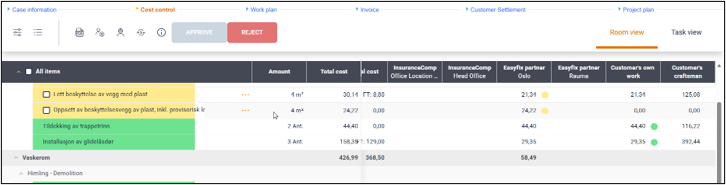
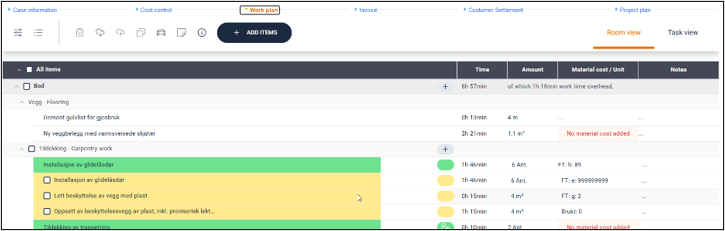
We’ve received feedback that the Cost Control and Workplan views can be difficult to read due to the large number of rows and columns. To make it clearer which row you are looking at, we are now adding a row highlighting functionality to these views. When hovering with the mouse pointer on a row, the row will change color slightly and make it easier to know which row is being looked at. This way it is also easier to follow the values across all columns.
Improvements to Generic Rest Integrations
PPI Scores Integration
It is now possible to view and edit the PPI scores per partner office via APIs. You can retrieve any office’s PPI scores, and you can set new PPI scores. This allows for faster and more sophisticated allocation settings and will thereby improve partner management. The integration is limited to putting the same PPI scores on office level for all tasks. In this release it is not yet possible to have different PPI scores for different tasks per office.
Chat In
There are now APIs to post chat messages, both for the general chat and for the internal notes. This completes the Chat API development that was started in release 17.3.
Case GUID as Identifier
We are introducing a new identifier per case – a caseGuid. It will still be possible to use Case ID that has been used until now, but caseGuid is now another option. This ID will be included in all our webhooks and in GET integrations where cases are involved. The caseGuid has the benefit that unlike the Case ID it will always stay unchanged.
If you are interested in learning more about generic Rest integrations, please contact your in4mo customer contact person.